PHOTO & SCENE GUIDE / UPDATED NOVEMBER 3, 2026 · ENGLISH
How to Make a Hit the Road Dude AI Video
Turn one consenting adult’s portrait into a pickup-window parody of the State Property / Private Property exchange. Choose a clear photo, sign in and review the one-video price before checkout.
Create a Hit the Road Dude video ↗$6.60 for one 11-second, 768p, vertical video with AI-generated audio. Download included. No subscription.
Why State Property and Private Property?
The joke starts with an off-camera visitor describing the land as state property. The driver in a white pickup pauses in disbelief, insists it is private property and tells the visitor to leave. The misunderstanding, skeptical reaction and dismissive gesture make the scene recognizable. An AI remake recasts the driver and creates new audio; it does not reproduce the original recording or its voice.
PUBLIC VIDEOS / EXTERNAL REFERENCES
See the scene. Hear the reaction.
The source clip and a creator’s live-action remake show the expression, speaker roles and timing behind the format. These are public references, not ZNIX-generated samples or a promise of output quality.
Loading public video…
SOURCE RECORDING
The pickup-window source clip
Watch the white pickup, the off-camera visitor and the driver’s reaction. This is the public source recording, not an AI result.
Read the scene & speaker guide →Source credits · external
Original post by @bird28thegr8 ↗ · Public MP4 playback credited to Hit the Road Pets.
EXTERNAL REMAKE
A live-action lip-dub remake
A creator’s performance of the format. Compare the expression and delivery with the source; this is not a ZNIX generation.
Read the scene & speaker guide →Source credits · external
The source recording tries a public MP4 and falls back to the original TikTok player when unavailable. If a player is restricted, read the scene breakdown. Reference media is not a generation result or a reusable audio license.
Source history · external
Know Your Meme ↗EXTERNAL AI REMAKE / PUBLISHED INPUT + OUTPUT
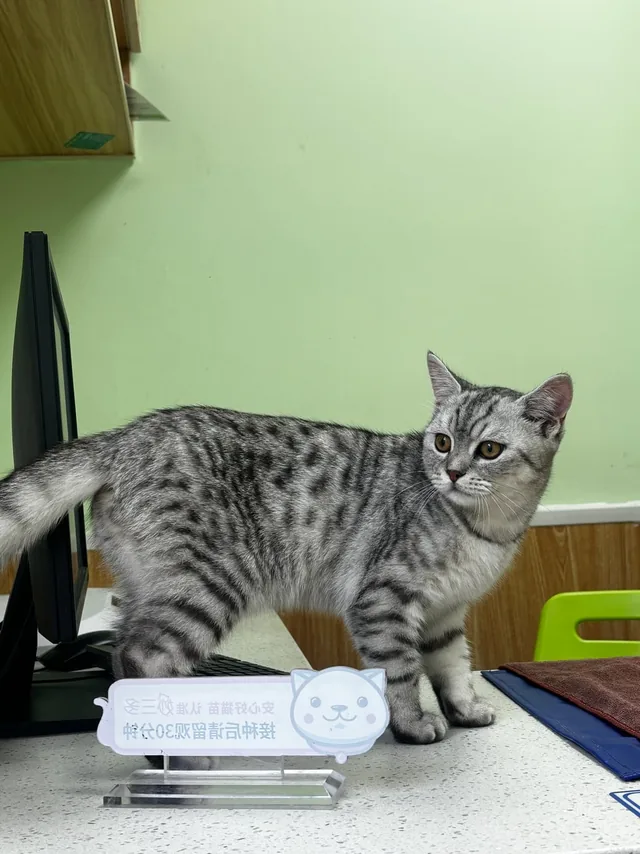
One portrait, a different pickup driver.
The publisher pairs this silver-tabby portrait with a 15-second pickup-window remake. This published version uses the source audio; it is not a ZNIX result and does not establish pet support here.
Loading public video…
External reference credited to Hit the Road Pets. Pet support is not available in this template.
PUBLIC STOCK PHOTOS / INPUT GUIDANCE
What a clear portrait looks like.
Use these photographs to compare framing and face visibility. They are independent photo references, not the inputs for either video above, and not people endorsing ZNIX.

Keep the eyes and mouth visible
Use a clear face with even light. Avoid sunglasses, face coverings and strong filters.
Photo by Joseph Gonzalez / Unsplash ↗
Choose a readable, front-facing portrait
A simple portrait makes facial details easy to inspect. Leave room around the head and shoulders in your own original.
Photo by Craig McKay / Unsplash ↗Shown under the Unsplash License for editorial photo guidance. They are not selectable generation inputs. For your own remake, use your own photo or obtain explicit permission from the adult pictured.
1. Choose a clear adult portrait
Use yourself or an adult who has explicitly agreed to this remake. Keep the eyes and mouth visible, with room around the head and shoulders. Avoid sunglasses, heavy filters, group photos and extreme angles. Pets, children, celebrities and other public figures are not supported.
JPG, PNG or WebP · up to 10 MB. 512–8192 px per side · up to 32 MP. Selecting a file checks it locally. Confirm all three photo and AI permissions; uploading happens only after you confirm checkout or generation.
2. Sign in and buy one video
Sign in before submitting. $6.60 buys one video with download included, without a subscription or general credit pack. Review the amount and continue to secure checkout. Your uploaded draft is saved for your account so it can be restored when you return.
A checkout return alone does not confirm payment. Wait for the paid video use to appear, or choose Verify payment for a pending order. Check your orders before buying again.
3. Generate with your paid video use
After payment is confirmed, choose Generate with my paid video and confirm. The tool creates an 11-second, 768p, 9:16 video using your portrait and a pickup scene reference, with AI-generated audio. The original voice and exact lip sync are not promised. Your task stays in your account while it processes; closing the dialog does not cancel it.
Check the speakers and reaction.
The intended performance keeps the visitor off camera and the driver visible through the reaction and dismissal. Generated voices, expressions and timing can vary.
OFF CAMERA
The visitor’s claim
A visitor near the water describes the land as state property. Keep this voice separate from the driver.
DRIVER AT THE WINDOW
The skeptical pause
The driver in the white pickup reacts with disbelief. The pause and facial expression carry the misunderstanding.
DRIVER AT THE WINDOW
The dismissal
The driver asserts that the land is private and gestures for the visitor to leave. The same driver stays visible through the reaction.
4. Watch and download the whole video
Open the video task from this tool or My videos. Once it is complete, play the full clip and download it without another payment. Review face consistency, hands, truck geometry, speech and sound before sharing. Label it as AI-generated and use only material you have permission to use.
Uploaded photos expire after 24 hours and ZNIX-hosted finished videos after 7 days. Download your result in time. Model-provider retention is separate.
If payment or generation needs attention
Refresh your orders or use Verify payment. Do not create another purchase simply because the return page is delayed.
Remove the expired draft and select your photo again. Check your existing paid video use before buying another.
A confirmed failed task restores its video use. Refresh your orders and explicitly prepare another attempt. This is not an automatic cash refund.
Open the saved task and refresh its status. An uncertain submission stays under reconciliation so a replacement cannot charge you twice. Contact support with the task and order IDs if it remains unresolved.
Inspect the full clip before sharing. A different portrait may help face visibility, but exact gesture transfer and speaker timing are not guaranteed. A successful generation does not automatically restore the paid use because of a stylistic difference.
Put your portrait in the driver’s seat.
Choose your photo ↗$6.60 / video · download included · no subscription