Your faces, a story built around them
Use one adult portrait as the survivor and one adult or pet photo as the zombie. The photos guide the characters; the model creates the movement and surroundings.
ZNIX STUDIO / ZOMBIE LOVE STORY
Two photos. One impossible goodbye. Turn two portraits into a 15-second zombie couple video, ending in a warm memory. Choose the pet story for a different cast.
01 / ZOMBIE STUDIO
Only for this tool and the selected quality. Completed videos consume an attempt. Failed tasks restore it; visual flaws do not count as failure.
Photos preview on your device. They upload only when you sign in and generate.
Use one adult portrait as the survivor and one adult or pet photo as the zombie. The photos guide the characters; the model creates the movement and surroundings.
Choose 480P or 720P and 9:16 for TikTok, Reels or Shorts, or 16:9 for a wider frame. Download the completed video and add your preferred music when posting.
Choose photos with one subject, a visible face and even lighting. Avoid sunglasses, heavy filters and group photos. For pets, show the face clearly.
Add clear portraits and choose a loved one or pet as the zombie.
A 15-second story. Vertical for short videos or landscape for a cinematic frame. Check the live quote first.
Check identity, movement and the memory transition, then download and add music in your posting app.
A complete 15-second recipe: recognition in a cold cabin, an embrace, then a warm memory. These frames come from our person sample; the timing of your shots can vary.
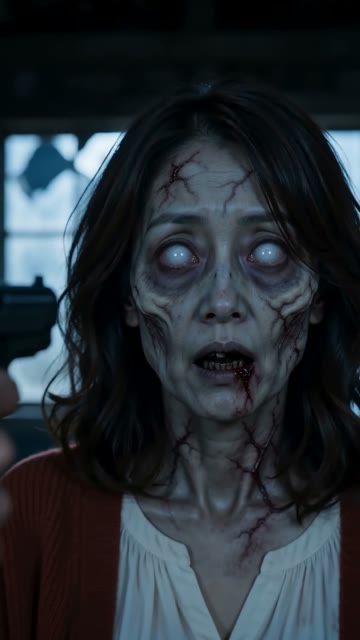 01
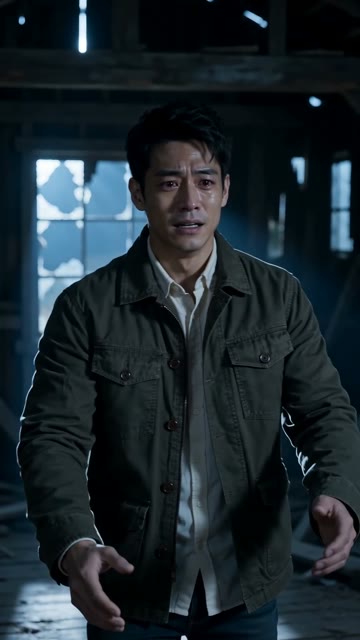 02
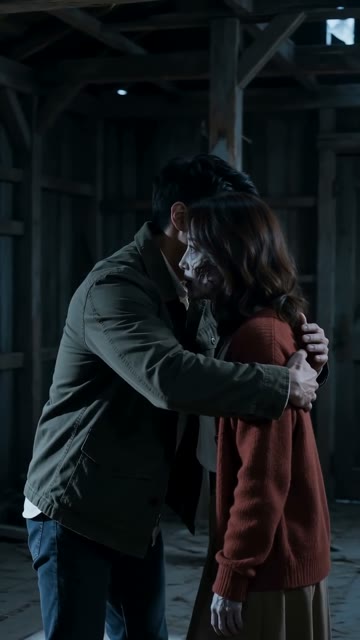 03
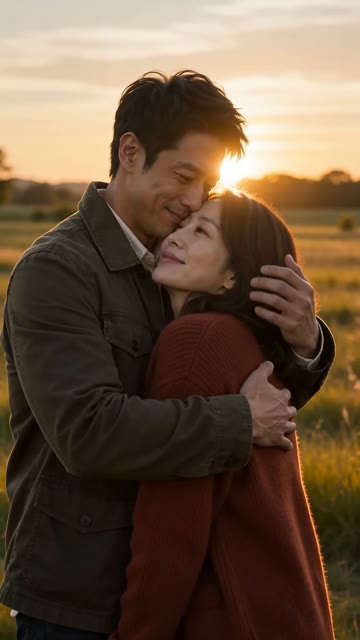 04
04 / PAY PER STORY
One payment, no subscription. Each generation uses one attempt, for a loved one or pet.
Start with one attempt to explore the preset. Three or six attempts let you try different photos or casts. Each attempt creates one video at the selected quality; larger packs do not improve face accuracy.
Only for this tool and the selected quality. Completed videos consume an attempt. Failed tasks restore it; visual flaws do not count as failure.
Experimental story preset. Faces, movement and the transition can vary. Full-story quality has not yet been verified with a representative test set.
Only for this tool and the selected quality. Completed videos consume an attempt. Failed tasks restore it; visual flaws do not count as failure.
View pay-per-use packs →The story recipe is built in. Identity, motion and transitions can still vary.
Yes. Use one adult portrait and one pet photo. Pet roles cannot be swapped.
Choose silent or original AI sound when available. Add trending songs in your posting app.
A task recorded as failed restores its pack attempt after settlement. A completed video consumes one attempt, even if faces, movement or transitions are imperfect. Buying a pack does not guarantee a particular result.
The guides and prompts are free; generating a video is paid. Sign in and buy a pack for this tool, or explicitly choose to use existing platform credits. No subscription is required for a pack.
The person video and four story frames are actual ZNIX output, using fictional AI adults. The default 720P portrait with original sound matches that sample. The pet recipe has no reviewed ZNIX output yet; any external pet inspiration is labeled separately. Results vary.
Yes. Attempts are valid for 365 days after payment and apply only to this tool and the purchased quality. You can choose either the loved-one or pet story.
Create an original 15-second cinematic zombie love story using both reference images. Image 1 is the adult human survivor: healthy natural skin and normal eyes throughout; preserve their face, hair and clothing. Image 2 is the adult loved one, unmistakably an undead zombie from the first shot: both eyes are opaque milky-white with no visible iris or pupil; deep charcoal-purple eye sockets; desaturated ash-gray skin; pronounced dark branching veins on the forehead, temples and neck; dry cracked surface texture; hollow cheeks and pronounced cheekbones; dark lips and slightly parted lips revealing aged discolored teeth. These are visible horror makeup details, not just a cold lighting effect. Preserve the underlying facial identity, hair and clothing while allowing strong zombie makeup. No exposed flesh or open wounds. Keep the two identities separate. Only the character from Image 2 is a zombie. Four ordered story beats: 0-4s, inside a cold blue-gray abandoned cabin, open with a clear close-up of the zombie face so the milky eyes, dark sockets and undead textures are easy to see; then establish the survivor recognizing their loved one approaching. 4-7s, show the healthy survivor's tearful hesitation; the survivor lowers an unfired prop handgun to the floor and opens their arms. 7-11s, the loved one approaches slowly and they embrace gently; keep the zombie eyes, dark sockets and gray textured skin fully visible throughout the cabin and embrace, without healing early. No attack or bite. 11-15s, hard match cut on the same embrace pose to a warm golden meadow at sunset: both are now healthy, happy and alive. Only at this cut remove all zombie makeup, dark veins and cloudy eyes; restore natural skin and normal eyes. Hold the warm memory long enough to read. Maintain identity, relative size, outfits and screen positions across shots. Strong visual contrast between unmistakably undead Image 2 in the cabin and healthy Image 2 in the meadow. Avoid a merely pale, tired or sad normal person; do not apply zombie makeup to the survivor. Natural hands and limbs, no extra characters, no text, logos or watermark. No blood, gore, open wounds, gunfire or aggressive violence. Generate a silent video with no music, speech or sound effects. Create my zombie story ↗Create an original 15-second cinematic zombie love story using both reference images. Image 1 is the adult human survivor: healthy natural skin and normal eyes throughout; preserve their face, hair and clothing. Image 2 is the beloved pet, visibly undead from the first shot: opaque milky-white eyes with no visible iris, deep dark shading around the eyes, dusty matted fur retaining its original markings, and cold gray discoloration on the exposed muzzle and nose. Preserve its species, size, collar and natural animal anatomy; never turn it into a human. Use dry superficial skin texture, not injury. The owner kneels to embrace the pet. Keep the two identities separate. Only the character from Image 2 is a zombie. Four ordered story beats: 0-4s, inside a cold blue-gray abandoned cabin, open with a clear close-up of the zombie face so the milky eyes, dark sockets and undead textures are easy to see; then establish the survivor recognizing their loved one approaching. 4-7s, show the healthy survivor's tearful hesitation; the survivor lowers an unfired prop handgun to the floor and opens their arms. 7-11s, the loved one approaches slowly and they embrace gently; keep the zombie eyes, dark sockets and gray textured skin fully visible throughout the cabin and embrace, without healing early. No attack or bite. 11-15s, hard match cut on the same embrace pose to a warm golden meadow at sunset: both are now healthy, happy and alive. Only at this cut remove all zombie makeup, dark veins and cloudy eyes; restore natural skin and normal eyes. Hold the warm memory long enough to read. Maintain identity, relative size, outfits and screen positions across shots. Strong visual contrast between unmistakably undead Image 2 in the cabin and healthy Image 2 in the meadow. Avoid a merely pale, tired or sad normal person; do not apply zombie makeup to the survivor. Natural hands and limbs, no extra characters, no text, logos or watermark. No blood, gore, open wounds, gunfire or aggressive violence. Generate a silent video with no music, speech or sound effects. Create my zombie story ↗The guides and prompts are free. Video generation requires sign-in and a paid attempt or enough platform credits.
ZNIX / ZOMBIE LOVE STORY
Choose your cast, preview both photos and review a one-time pack before generating.
Create my zombie story